Closed pilot, taking on a handful of MSPs

Printer management without the agents

ZenPrint runs printer discovery, driver deployment, queue config, and toner monitoring through the RMM you already have. Nothing extra to install on any endpoint.

Free while the pilot runs. We set your account up by hand, so leave an email address if you're interested in joining.
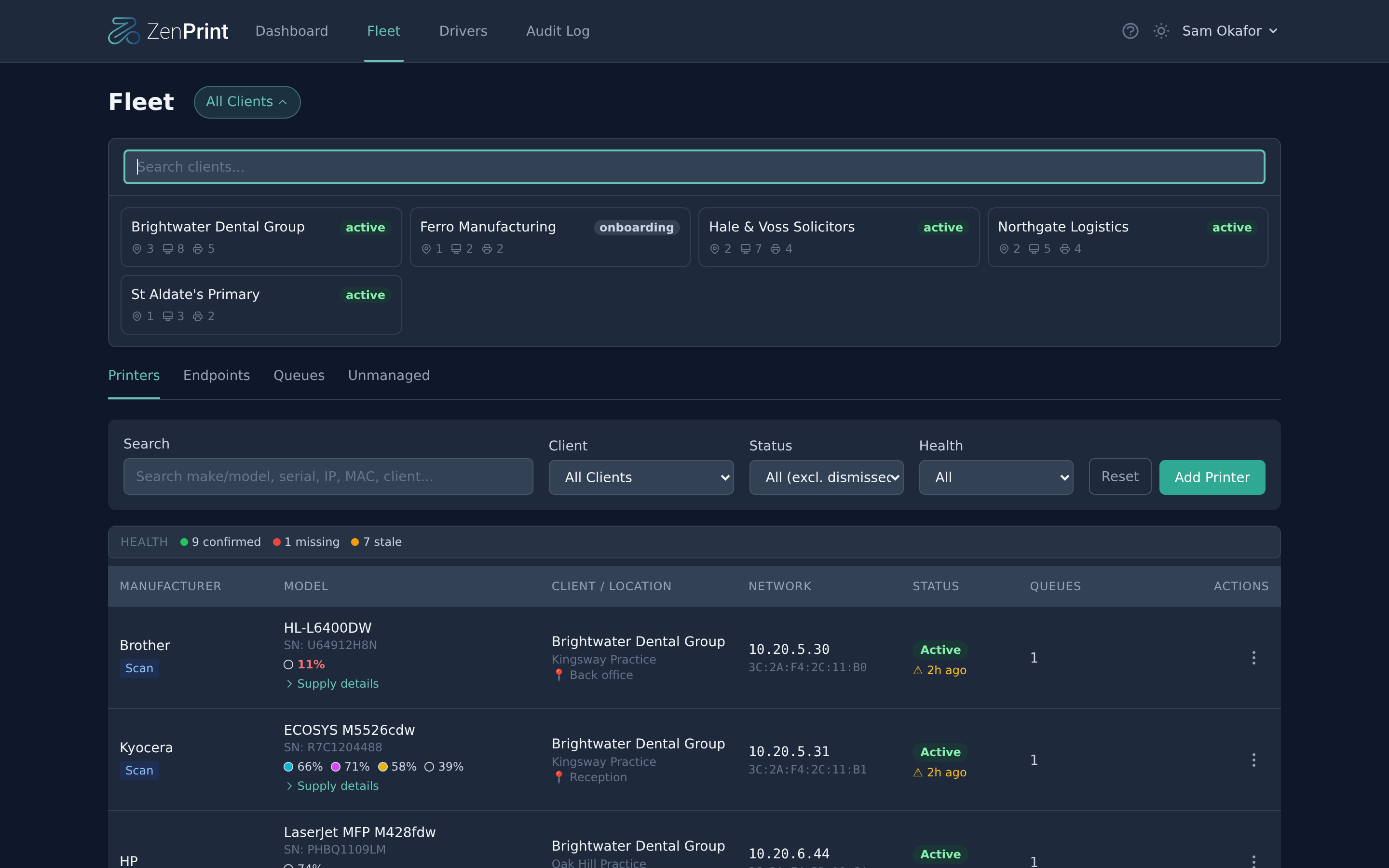
ZenPrint fleet view: five client sites, printer health counts, and live toner levels per device

You've probably already scripted some of this

Most MSPs have something in place. A few PowerShell scripts, a document with model numbers and IP addresses, maybe a tool that covers part of it. It works.

What's harder is keeping the picture current. Which printers this client actually has now, which queues sit on which machines, whether the config still matches what you set. That tends to live in a document someone updates when they think of it.

ZenPrint keeps it as live data instead. The same work you'd script yourself, run through the RMM agent that's already on the endpoint, with the results in one place.

How it works

One PowerShell script goes into your RMM's script library. You run it against endpoints on demand or on whatever schedule you want to use, and it picks up its instructions from ZenPrint at run time.

1

Load the script

Paste the bootstrap script into your RMM's script library and add your API key. That's the whole install. Endpoints only talk outbound to ZenPrint over HTTPS, so there's no VPN and no inbound firewall rule.

2

Let it find the printers

A scan run sweeps the local subnets over SNMP and reports back every printer it finds. If your RMM tracks customers and sites, ZenPrint uses those and the results land under the right client on their own. If it doesn't, you map its groups to your clients once and everything files itself after that.

3

Set what should be installed

Build a queue, pick a driver, and assign it to a site, a group of machines, or a single endpoint. Every reconcile run after that makes the endpoint match, and flags anything that has drifted.

Toner and supply levels

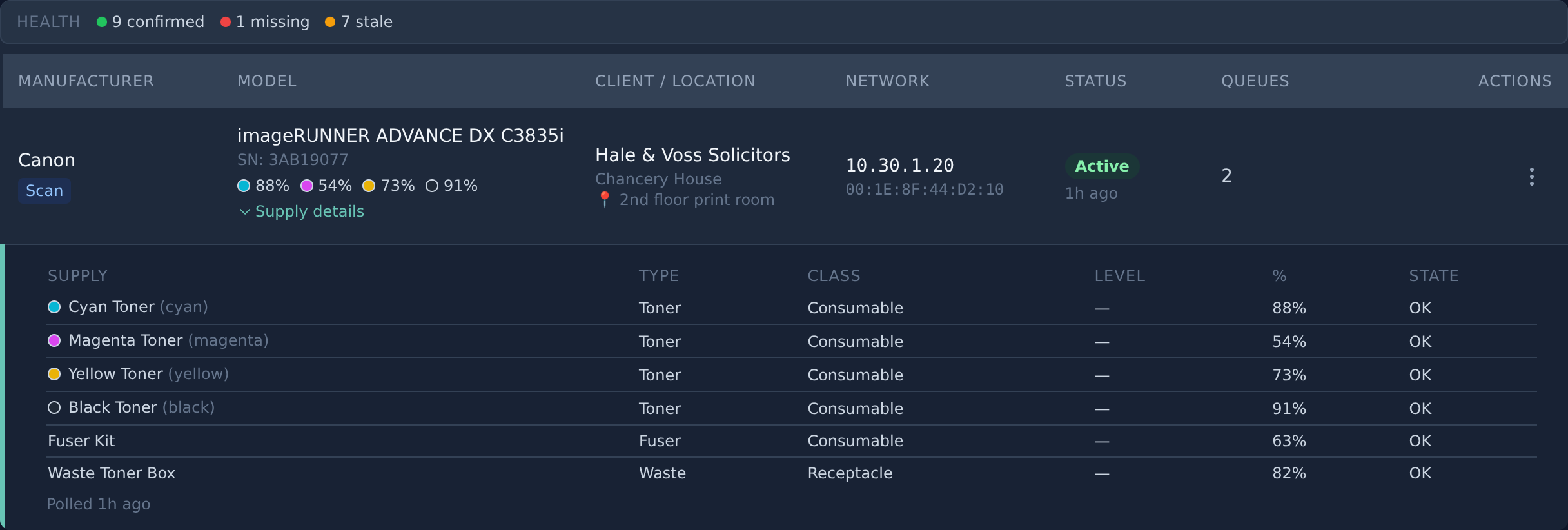
ZenPrint polls each printer over SNMP and keeps the readings. Toner and ink per colour, plus drums, fusers, transfer kits and how full the waste box is. Set a threshold and you get an email or a webhook when something crosses it, before the client calls.

Supply breakdown for a Canon MFP: cyan, magenta, yellow and black toner percentages, fuser kit, and waste toner box
Page counts and firmware. Picked up on the same poll and shown per printer. The page count is the device's own lifetime counter, not a per-period volume report.
Offline detection. A printer that stops answering raises an alert, and clears it again when it comes back.
No print jobs involved. These are the device's own counters, read over SNMP. ZenPrint doesn't sit in the print path.

Queues that stay the way you set them

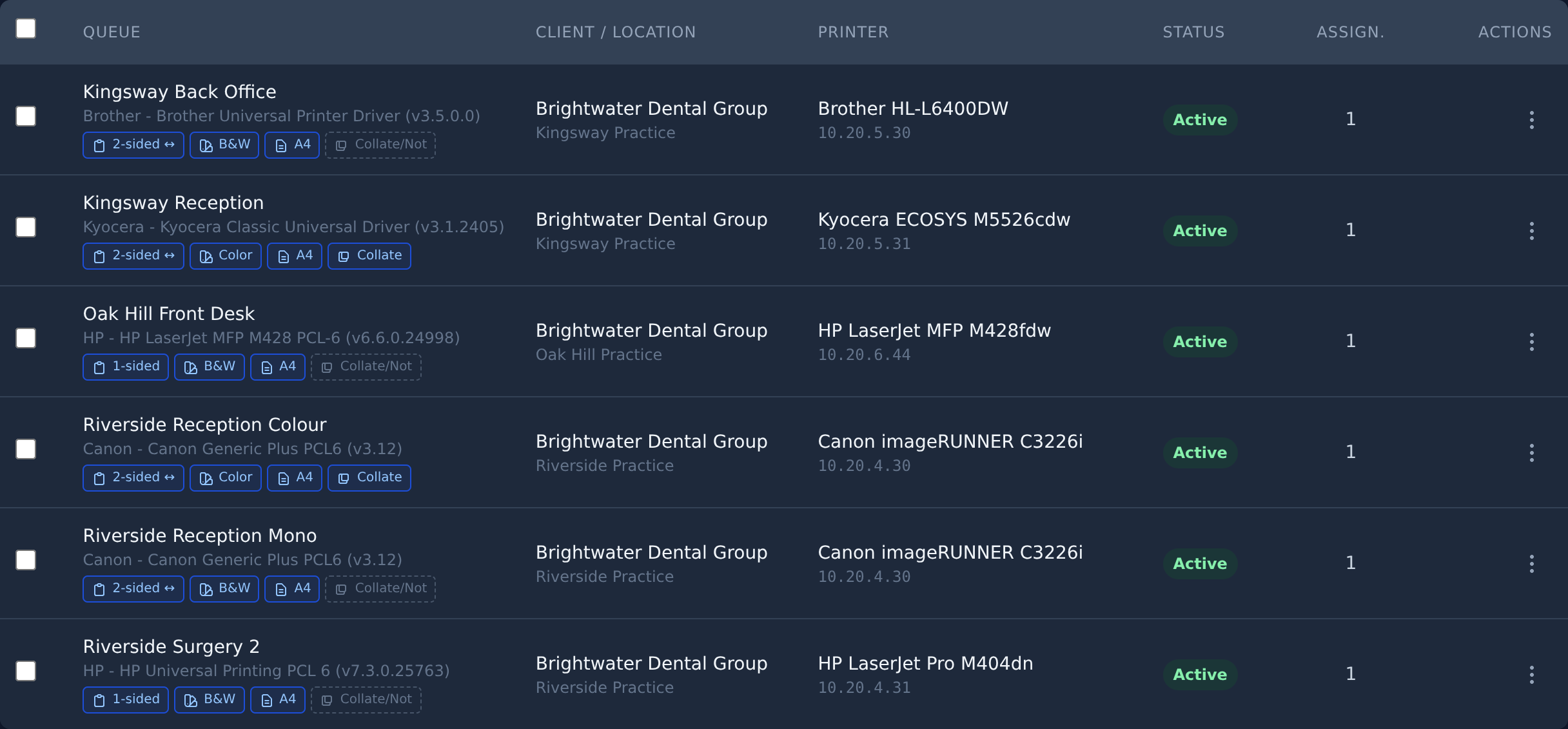
A queue is a printer, a driver and a config: duplex, colour, paper size, collation. Assign it at site level and every machine at that site gets it. Assign it to a group and only that department does. When an endpoint checks in, reconcile compares what's installed against what you asked for and fixes the difference.

Queue list showing duplex, colour, paper size and collation settings per queue across several clients

What needs attention

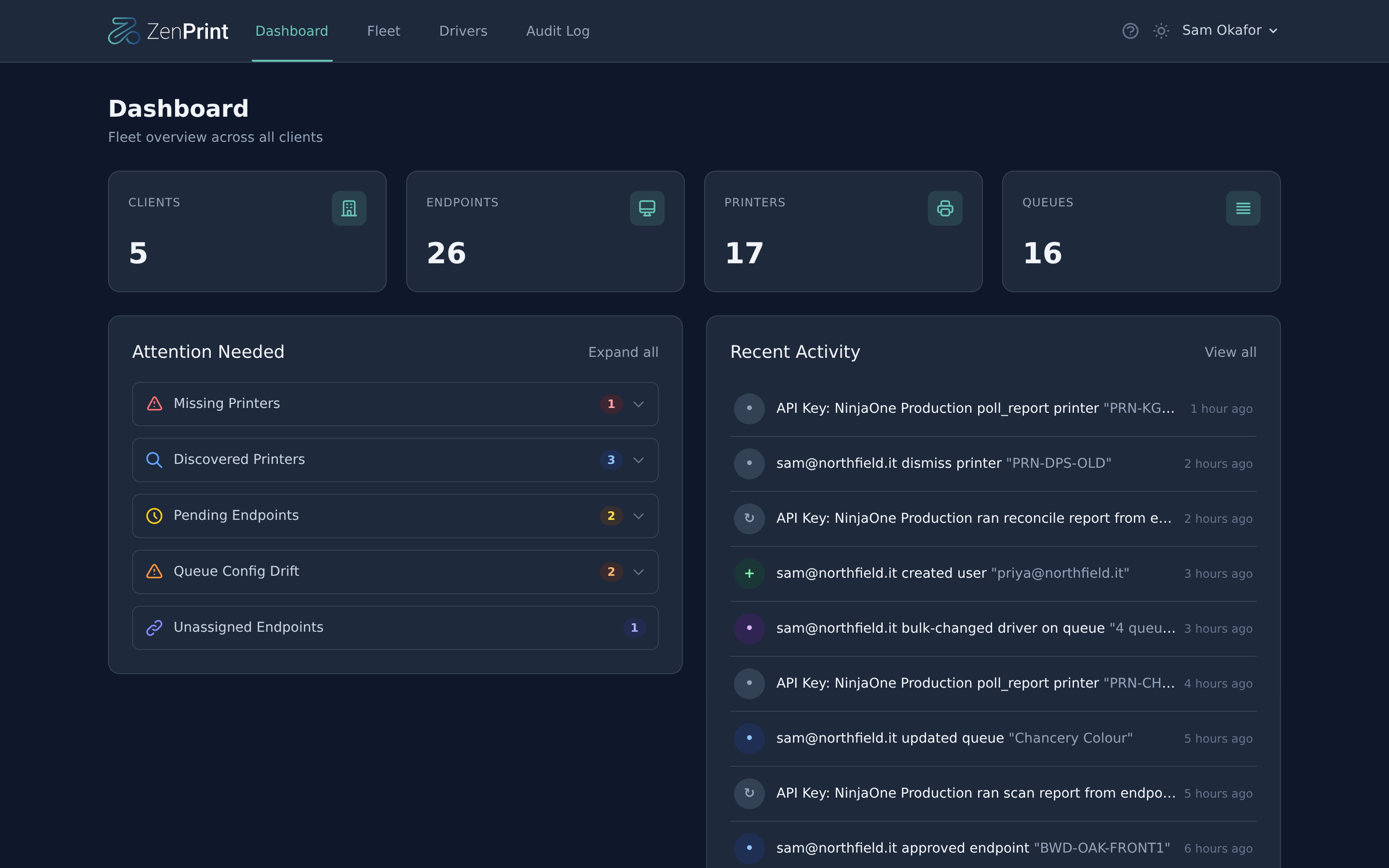
New printers found on a client network, endpoints waiting for approval, queues whose config has drifted, devices that stopped answering. Grouped per client and site, so you can work through it.

ZenPrint dashboard: counts for clients, endpoints, printers and queues, an attention-needed list, and a recent activity feed

Also included

Driver capture

Pull a driver off a machine where the printer already works, instead of hunting the vendor site for a package that matches. It goes into your library and deploys to everything else.

Driver library

Captured drivers, packages you upload and a shared set we maintain, all in one list. Swapping the driver on live queues is one action with a confirmation, not a delete and rebuild.

Signed scripts

Every script ZenPrint hands to an endpoint is Authenticode-signed. The bootstrap checks the signature against a pinned certificate before running anything, and stops if it doesn't match.

Security

Two-factor is required for every user, not a setting to remember. Each MSP gets its own database schema, so your data is separated from other tenants at the database level.

Roles and client scoping

Build your own roles from per-resource permissions and scope a role to specific clients, so a first-line tech sees the sites they cover and nothing else.

Audit log

Every change, who made it and what changed. Script runs from your RMM land in the same feed, tagged with the endpoint they came from.

Alerts and webhooks

Beyond supplies: offline printers, drifted queues and endpoints that haven't been mapped to a client yet. By email, or as a webhook into whatever you use to open tickets.

Discovery triage

A scan turns up plenty you don't manage: someone's desk inkjet, a label printer in a cupboard. Dismiss those and they stay out of the way until you want them back.

Other features

Want something that isn't here? Let us know and we'll see what we can do. At this stage what pilot users ask for still shapes what gets built next.

Supported RMMs

NinjaOne, Level.io and Octoja work today. Only the bootstrap script is specific to an RMM. Everything behind it is shared, so supporting a new one is mainly a matter of testing it against a real setup.

Getting more of them supported is part of what the pilot is for. If you run something else, get in touch anyway.

Pricing

During the pilot

Free

No printer limit and nothing held back. What we ask in return is that you run it on real clients and tell us what breaks.

After launch

5 printers free

The free tier stays free, with no limit on how many clients you spread those printers across. Above that it's a paid plan, priced per managed printer.

Printers you've only discovered don't count towards it. Neither does monitoring their supply levels.

Questions we get

Do you see print jobs, users or page volumes per person?

No. ZenPrint reads the printer's own counters over SNMP and never touches a print job. There's no spooler to install and nothing sitting between the user and the printer, which is the point of being agentless. If you need per-user tracking, quotas or secure release, you need a product built around a print server. We're not planning to build that.

What runs on the endpoint?

A PowerShell script, started by your RMM, that runs and exits. Nothing stays resident, nothing listens on a port and there's no service to keep alive. It does leave a registry key at HKLM\SOFTWARE\ZenPrint holding the endpoint's ID and which queues ZenPrint manages, so the next run knows what it set up. There's a cleanup mode that removes it again.

Do you need access to the client's network?

No. The script talks outbound to ZenPrint over HTTPS and does the SNMP work from inside the network itself. Nothing of ours reaches in.

Will it interfere with the queues that are already there?

Not unless you ask it to. Reconcile manages the queues you created in ZenPrint. Anything else it finds gets reported so you can see it, and left alone. Removing a queue is something you do deliberately.

Who is the pilot for?

Any MSP willing to run it on real clients and tell us what's wrong with it. Size doesn't matter much. What matters is that you actually use it and come back to us with feedback.

Apply for the pilot

We're onboarding a small group of MSPs, one at a time, and helping each one get set up. It's free while it runs.

Leave your email and we'll get back to you with a few questions about your setup.